
Time-logger
What’s “Time-logger”?
This app is just a simple stopwatch. You can keep track of your working time and break time.
Also, you can send the history log (csv-file) as an email attachment.
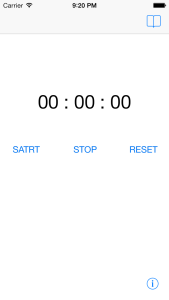
Features:
- Simple GUI
- Automatic break time measurement.
- You can send a csv-file of the logs by email.
- You can add notes for each log.
Purpose
- Time-logger is helpful for your revising how to manage your time.
- This app is very simple, so you can also save your time to keep a time log.
Getting started
Keep a time log
– Push start button. The time on the display start to run.
– When you have a break, push stop button.
– When you restart, push start button again.
– When you finished your work, push stop button and then push reset button. The app add the log automatically.
Check the logs
– Push book shaped button on the top right corner of the screen.
– To check details for each item, push the row which you want to see.
– You can correct working time and break time when you forget pushing “stop button” even though you have a break.
– To clear the logs, back to first view and push info-button. Then push “Clear all of the history” button.
Send a csv-file
– From the first view, push book shaped button on the top right corner of screen, then push an action button on the top right corner of the next screen.
– Type an email address where you send to. Then push “Send Email” button. The standard mail app start to run automatically.